
wordpress WordPressのカテゴリー管理でゴミ箱を作る 作成日: 2026年2月5日
 通常要らないと思うが、開発中に開発用カテゴリーを作り投稿することを繰り返す中で邪魔なカテゴリーは削除しないといけなかった。
投稿はゴミ箱で残るから再利用できるが、カテゴリーが削除されていると整合を欠くので作り直さなければならず、まったく同じに作り直さないと不整合となることも有る。
なので「カテゴリーのゴミ箱」が欲しくなったが、PLは嫌なのでAIに作らせた。
思想としては「ゴミ箱」というカテゴリーを作り、その子カテゴリーとする。
一覧からは消し、カテゴリーゴミ箱の「中身を見る」で確認し、復元可能とする。当然そのスラッグに拠るページもなしにする。
必要な場合はあったら便利かも。
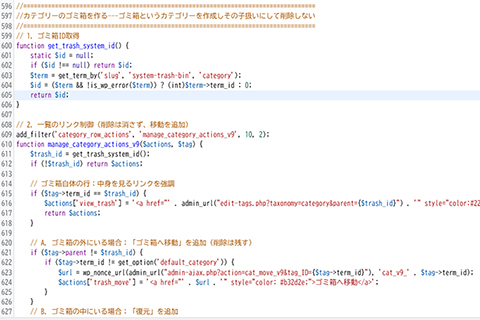
//===================================================================================//カテゴリーのゴミ箱を作る---ゴミ箱というカテゴリーを作成しその子扱いにして削除しない//===================================================================================// 1. ゴミ箱ID取得function get_trash_system_id() {static $id = null;if ($id !== null) return $id;$term = get_term_by('slug', 'system-trash-bin', 'category');$id = ($term && !is_wp_error($term)) ? (int)$term->term_id : 0;return $id;}
// 2. 一覧のリンク制御(削除は消さず、移動を追加)add_filter('category_row_actions', 'manage_category_actions_v9', 10, 2);function manage_category_actions_v9($actions, $tag) {$trash_id = get_trash_system_id();if (!$trash_id) return $actions;
// ゴミ箱自体の行:中身を見るリンクを強調if ($tag->term_id == $trash_id) {$actions['view_trash'] = '<a href="' . admin_url("edit-tags.php?taxonomy=category&parent={$trash_id}") . '" style="color:#2271b1; font-weight:bold;">中身を見る</a>';return $actions;}
// A. ゴミ箱の外にいる場合:「ゴミ箱へ移動」を追加(削除は残す)if ($tag->parent != $trash_id) {if ($tag->term_id != get_option('default_category')) {$url = wp_nonce_url(admin_url("admin-ajax.php?action=cat_move_v9&tag_ID={$tag->term_id}"), 'cat_v9_' . $tag->term_id);$actions['trash_move'] = '<a href="' . $url . '" style="color: #b32d2e;">ゴミ箱へ移動</a>';}}// B. ゴミ箱の中にいる場合:「復元」を追加else {$url = wp_nonce_url(admin_url("admin-ajax.php?action=cat_restore_v9&tag_ID={$tag->term_id}"), 'res_v9_' . $tag->term_id);$actions['restore'] = '<a href="' . $url . '" style="color: #0073aa; font-weight: bold;">復元する</a>';}
// 行に親IDクラスを付与するJS(非表示制御用)if ($tag->parent) {echo '<script>document.addEventListener("DOMContentLoaded", function() {var row = document.getElementById("tag-' . $tag->term_id . '");if(row) row.classList.add("parent-' . $tag->parent . '");});</script>';}return $actions;}
// 3. CSSによる隔離制御(絶対に500エラーを出さない方式)add_action('admin_head', function() {$trash_id = get_trash_system_id();if (!$trash_id) return;$is_viewing = (isset($_GET['parent']) && (int)$_GET['parent'] === $trash_id);echo '<style>';if (!$is_viewing) {// 通常画面:ゴミ箱の中身を非表示echo '#the-list tr.parent-' . $trash_id . ' { display: none !important; }';} else {// ゴミ箱閲覧時:中身だけを出し、他を隠すecho '#the-list tr:not(.parent-' . $trash_id . ') { display: none !important; }';echo '.search-form, .tablenav.top .actions:not(.bulkactions) { display: none; }';}echo '</style>';});
// 4. 移動・復元の実行(Ajax)add_action('wp_ajax_cat_move_v9', 'handle_cat_move_v9');add_action('wp_ajax_cat_restore_v9', 'handle_cat_restore_v9');
function handle_cat_move_v9() {$tag_id = intval($_GET['tag_ID']);check_admin_referer('cat_v9_' . $tag_id);$trash_id = get_trash_system_id();if ($trash_id && current_user_can('manage_categories')) {wp_update_term($tag_id, 'category', array('parent' => $trash_id));wp_update_term_count_now(array($trash_id), 'category');}wp_safe_redirect(admin_url('edit-tags.php?taxonomy=category')); exit;}
function handle_cat_restore_v9() {$tag_id = intval($_GET['tag_ID']);check_admin_referer('res_v9_' . $tag_id);if (current_user_can('manage_categories')) {wp_update_term($tag_id, 'category', array('parent' => 0));wp_update_term_count_now(array(get_trash_system_id()), 'category');}wp_safe_redirect(admin_url('edit-tags.php?taxonomy=category')); exit;}
// 5. 投稿IDリストの表示(子カテゴリごとの関連ポスト抽出)add_filter('manage_edit-category_columns', function($cols) { $cols['post_ids'] = '関連投稿ID'; return $cols; });add_action('manage_category_custom_column', function($content, $col, $id) {if ($col === 'post_ids') {global $wpdb;$ids = $wpdb->get_col($wpdb->prepare("SELECT object_id FROM $wpdb->term_relationships WHERE term_taxonomy_id = (SELECT term_taxonomy_id FROM $wpdb->term_taxonomy WHERE term_id = %d LIMIT 1)", $id));return $ids ? '<small style="color:#888;font-size:10px;word-break:break-all;">' . implode(',', $ids) . '</small>' : '-';}return $content;}, 10, 3);
// 6. ゴミ箱カテゴリーおよびその子カテゴリーのアーカイブページを完全に封鎖(404化)add_action('template_redirect', 'restrict_trash_category_access');function restrict_trash_category_access() {// ゴミ箱のIDを取得$trash_id = get_trash_system_id();if (!$trash_id) return;
// 現在表示しようとしているカテゴリーが、ゴミ箱自身かその子であるか判定if (is_category()) {$current_cat_id = get_queried_object_id();// ゴミ箱IDそのもの、または親がゴミ箱である場合if ($current_cat_id === $trash_id || cat_is_ancestor_of($trash_id, $current_cat_id)) {global $wp_query;$wp_query->set_404();status_header(404);nocache_headers();// 必要に応じてここにホームへリダイレクトを入れることも可能// wp_safe_redirect(home_url()); exit;}}}
WP6.9・PHP8.2で作ったからテーマや他のPLとの干渉がなければWP6.9PHP8.2なら動くと思う。
WP6の後半、PHP8~なら動くんじゃないかな。
これをfunction.phpに追記すると、カテゴリーをゴミ箱移動が可能になる。
一つでも移動すると「ゴミ箱」というカテゴリーが生成され、移動したものは「ゴミ箱」の子カテゴリーになる。